

On this page
What does an Airbnb profit calculator measure?
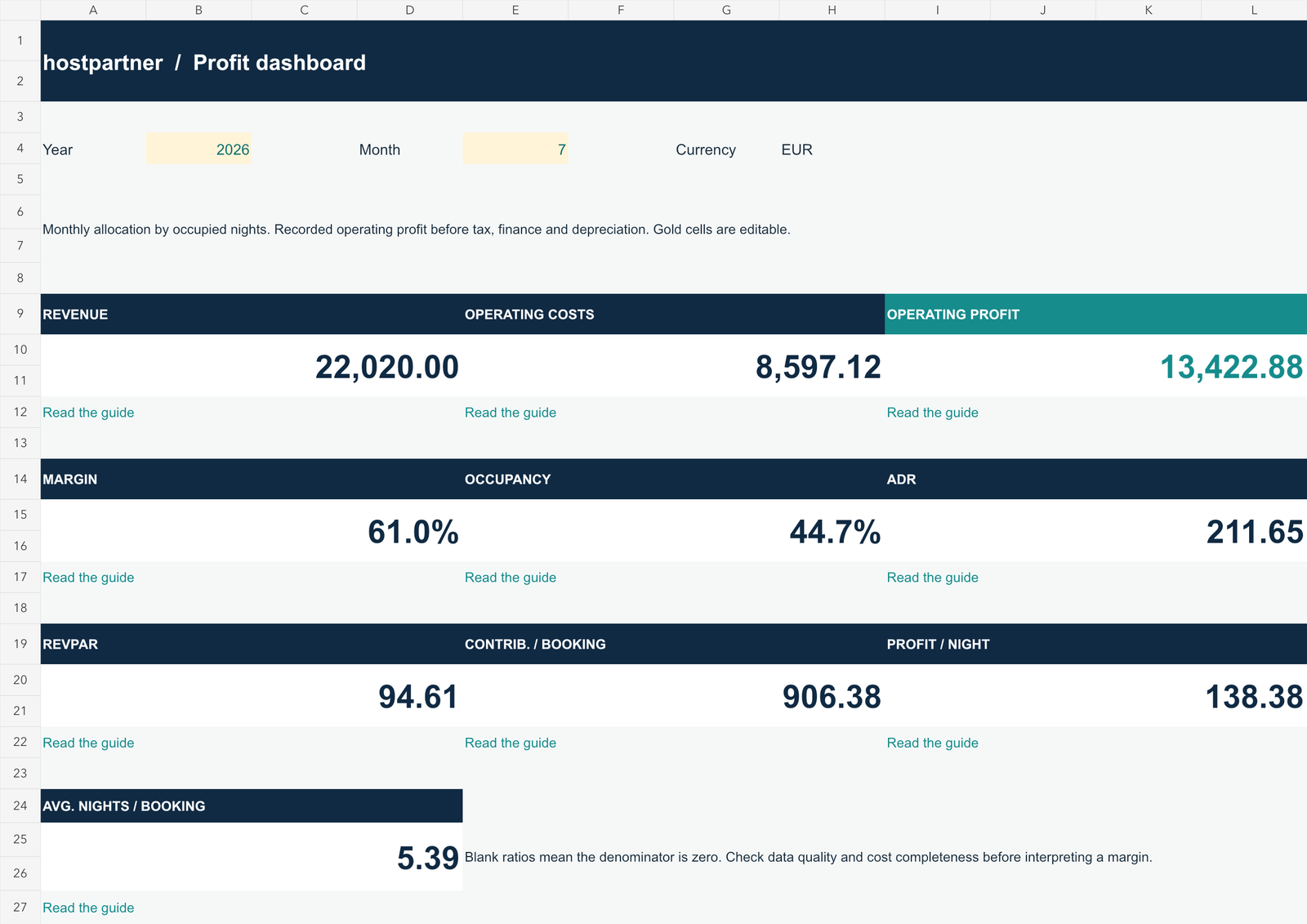
A profit calculator subtracts recorded operating costs from rental revenue for the same period. Hostpartner combines accommodation revenue and cleaning fees charged, deducts booking-level costs and other property expenses, and shows the resulting operating profit and margin. Occupancy, ADR and RevPAR help explain how that result was generated.
Margin = operating profit ÷ revenue × 100. Missing costs make the result incomplete.
What do I need to enter?
- Unique property names, a consistent currency and each property’s Active status.
- Your Airbnb fee model: common 15.5%, Brazil/Mexico 16%, legacy split fee or a custom rate.
- Booking dates, gross accommodation revenue, cleaning and other host charges; use the row override when one reservation has a different rate.
- Cleaning, laundry, consumables and other booking or dated property costs.
- Blocked-night counts for each property and month.
The calculator uses manual inputs and does not connect to Airbnb. It applies the selected percentage to the fee-bearing subtotal, while the reservation override lets you reconcile older or exceptional bookings. Follow the input-clearing checklist before replacing the examples.
€935 in revenue. How much remains?
Take the first MARINA LOFT booking in the supplied workbook: five nights, €850 accommodation revenue and €85 cleaning charged to the guest.
Operating margin is €527.07 ÷ €935 = 56.4%. Booking costs include the calculated €144.93 platform fee at 15.5%, plus €70 cleaning, €30 laundry and €18 consumables. This is a worked example, not a market benchmark.
Trace every input and calculation →What is inside the download?
Set up and record
START HERE, PROPERTIES, AVAILABILITY, STAYS and EXPENSES guide the inputs that feed your results.
Review and understand
DASHBOARD, PROPERTY VIEW, MONTHLY DATA and READ & ACT connect the monthly results to the records and their interpretation.
The ten indicators are revenue, operating costs, operating profit, margin, occupancy, ADR, RevPAR, contribution per booking, profit per occupied night and average nights per booking.
Read the definition of each metric →Who is it for, and what are its limits?
It suits hosts, cohosts and small managers who can keep manual records for up to seven properties. Use one currency and one selected analysis year per working file. The fixed ranges accommodate 400 stays and 400 expenses; adding rows does not automatically extend the calculations.
Booking revenue and variable costs are spread evenly across occupied nights. Other expenses follow their recorded dates. The workbook checks certain invalid inputs and overlapping stays, but it cannot detect every missing cost or duplicate invoice.
It does not calculate tax, VAT, financing, depreciation, cash flow or full investment ROI, and it has no automated refund or cancellation workflow. Read how bookings crossing months are allocated before interpreting monthly results.
Common questions about the calculator
Is the calculator free?
Yes. Complete the download form with your email and phone number to access the Excel workbook. The overview and user guide are available to read without registering.
Is the example data my expected income?
No. The fictional records show how to fill in the calculator and follow its formulas. They are not forecasts, benchmarks or promises of rental income. Replace the input examples with your own records.
Does it calculate my net profit or investment return?
It calculates operating profit from recorded revenue and operating costs. It does not calculate net income, cash flow, tax, VAT, financing, depreciation or full investment ROI.
Does it connect to Airbnb or import bookings?
No. Enter the data manually. Hostpartner is an independent tool and is not affiliated with Airbnb. There are no automatic connections to booking platforms, banks or PMS systems.
Can I use net platform payouts as revenue?
No. Enter gross accommodation revenue, cleaning and other host charges. The workbook calculates the platform fee from the selected model or your reservation-level override. A net payout would deduct the same fee twice.
Are recurring bills created automatically?
No. Recurring is a descriptive label. Enter each incurred expense as a dated row. A €40 monthly bill needs a €40 entry for every month you want to include.
Which spreadsheet application should I use?
The download is an .xlsx workbook. These instructions follow the supplied Excel file. Behavior in other applications, including Google Sheets, has not been verified; check formulas, validation and charts before relying on an imported copy.
Bring your revenue and costs into focus.
Download the calculator, replace the examples and follow the guide to review your own monthly results.
Get my free profitability calculator ↗Read the complete user guide · Understand operating profitability
Method checked against Hostpartner profitability calculator v3.0, updated 20 September 2026. Fee percentages are scenarios: verify the rate in your own Airbnb account. All screenshots use fictional data.